
Inline syntax
Autolinks, and app-specific tokens like @mention, #channel and :emoji:.
Autolinks
Section titled “Autolinks”Bare URLs, www. hosts, email addresses and <…> autolinks become links with
no pre-processing:
GptMarkdown( onLinkTap: (url, title) => launchUrlString(url),)Bare autolinks follow the GFM autolink extension, so the awkward cases come out right:
| Input | Links to |
|---|---|
see https://x.com. |
https://x.com — the period stays outside |
(https://x.com) |
https://x.com — unbalanced ) stays outside |
https://en.wikipedia.org/wiki/Foo_(bar) |
the whole URL — parens balance |
www.example.com |
http://www.example.com |
[email protected] |
mailto:[email protected] |
**https://x.com** |
bold link, ** never reaches the href |
_https://x.com |
https://x.com — GFM allows a link after _, as after *, ~, ( |
`https://x.com` |
nothing — it stays code |
<https://x.com>, <mailto:[email protected]> and <[email protected]> follow CommonMark §6.5.
The parser reads them as links (MdLink with autolink: true), with the
brackets dropped.
Schemes
Section titled “Schemes”http, https, mailto and xmpp are linked bare. Anything else is opt-in:
GptMarkdown(text, autolinkSchemes: const {'myapp', 'slack'})Turn it all off:
GptMarkdown(text, autolink: false)Explicit [label](url) links keep working; <https://x.com> reads as
written, brackets included.
Why this beats a pre-processor
Section titled “Why this beats a pre-processor”Removing it is the better fix. A pre-processor works on raw Markdown and has to
guess where the syntax ends and the URL begins — which is how
**https://x.com** becomes a link whose href ends in **.
Autolinking runs after the surrounding syntax is consumed: the parser claims
the ** first and hands the autolinker a clean URL. That class of bug cannot
happen. The same holds for backticked URLs, headings and table cells.
App-specific tokens
Section titled “App-specific tokens”Chat apps layer their own inline syntax on top of Markdown. #2959 is a
channel in one product, a topic in another, an issue in a third — so the
package supplies the mechanism and you supply the meaning.
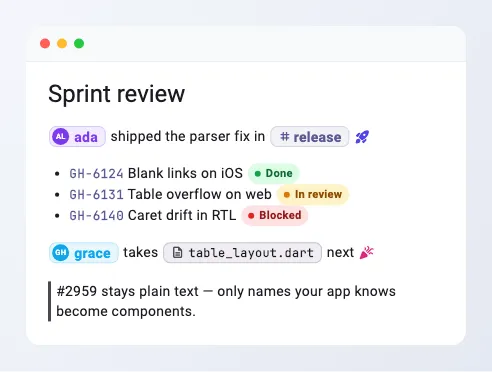
Every token above is an InlinePattern or InlineDirective the app supplies —
the builders are in
tool/screenshots/generate_test.dart.
#2959 in the quote stays plain text because only names the app knows match.
A simple pattern
Section titled “A simple pattern”GptMarkdown( text, inlinePatterns: [ InlinePattern( pattern: RegExp(r'(?<![\w-])GH-(\d+)\b'), builder: (context, match, style) => TextSpan( text: match.group(0), style: style.copyWith( color: Theme.of(context).colorScheme.primary, fontWeight: FontWeight.w600, ), recognizer: TapGestureRecognizer() ..onTap = () => openIssue(match.group(1)!), ), ), ],)Patterns are matched ahead of the built-in components, so a pattern beats
the default reading of the same text — a pattern whose regex covers **GH-1**,
asterisks and all, renders your chip rather than bold. Code and maths are
deliberate exceptions — fenced code (``` or ~~~), code spans of any
backtick length, \( … \) and \[ … \] maths (and $…$ with
useDollarSignsForLatex), and registered custom blocks. Their content is not
prose, and a pattern reaching inside would rewrite source the author asked to
see verbatim: `:wave:` stays the code :wave:. A code span pairs only
within its paragraph, and an escaped \` opens none, exactly as the parser
reads them.
On the deprecated legacy pipeline precedence is leftmost-match instead — a built-in whose match starts at an earlier offset swallows the text, and the pattern wins only when both start at the same offset.
Prefixed tokens
Section titled “Prefixed tokens”@name and #channel have a helper, because the boundary rules are fiddly —
an @ inside an email and a # in a URL fragment must not match.
InlinePattern.prefixed( prefix: '#', knownNames: myChannelNames, // ['general', 'design-review', …] builder: (context, match, style) => WidgetSpan( alignment: PlaceholderAlignment.baseline, baseline: TextBaseline.alphabetic, child: ChannelChip(name: match.group(0)!.substring(1)), ),)Longer names win over shorter ones, so #design-review is not shadowed by a
#design entry. Matching is case-insensitive.
// Only known channels — recommendedInlinePattern.prefixed(prefix: '#', knownNames: channels, builder: …)
// Any token at all — chips for things that are not channelsInlinePattern.prefixed(  prefix: '#',  knownNames: channels,  genericTokenPattern: r'[A-Za-z0-9_][A-Za-z0-9_-]*',  builder: …,)
Emoji shortcodes
Section titled “Emoji shortcodes”Shortcodes have their own helper, because prefixed cannot express them: it
has no closing delimiter, so :tada: would match :tada and leave a stray
colon behind.
const emoji = {'tada': '🎉', 'rocket': '🚀', 'fire': '🔥'};
InlinePattern.delimited(  open: ':',                    // close defaults to open  knownNames: emoji.keys,  builder: (context, match, style) {    final name = match.namedGroup('name');    final glyph = name == null ? null : emoji[name];    if (glyph == null) {      return TextSpan(text: match.group(0), style: style);    }    return TextSpan(text: glyph, style: style);  },)
The token name is the named group name, and also group 1 — whatever groups
your own genericTokenPattern contains.
Boundaries come with it: 10:30:45 and http://host:8080/x are not claimed,
:tada:xyz is not a shortcode, and :fire::fire: matches twice.
Emoji are characters, so a TextSpan works — selectable, wrapping, on the
baseline. Reach for a WidgetSpan only when the glyph is a real icon or image:
InlinePattern.delimited( open: ':', knownNames: iconTable.keys, builder: (context, match, style) { final name = match.namedGroup('name'); final icon = name == null ? null : iconTable[name]; if (icon == null) { return TextSpan(text: match.group(0), style: style); } return WidgetSpan( alignment: PlaceholderAlignment.middle, // Sized off the surrounding style, not a constant, so it stays // proportional when the paragraph's text style changes. child: Icon(icon, size: (style.fontSize ?? 14) * 1.15), ); },)delimited also handles asymmetric and multi-character delimiters —
::spoiler::, {{token}}, |redacted|:
InlinePattern.delimited(open: '{{', close: '}}', knownNames: …, builder: …)Prefer a TextSpan
Section titled “Prefer a TextSpan”Widgets returned from a pattern builder are handled correctly at raised text scales: the package wraps them so they do not scale twice.
Protected host data with InlineDirective
Section titled “Protected host data with InlineDirective”Use InlinePattern when the custom syntax is still ordinary text. Use
InlineDirective when a delimited payload must reach your builder verbatim and
must never be interpreted as Markdown.
For example, a server may insert a private marker containing JSON that the app turns into a widget:
const widgetOpen = '\u{E200}widget\u{E202}';const widgetClose = '\u{E201}';
GptMarkdown(  reply,  inlineDirectives: [    InlineDirective(      open: widgetOpen,      close: widgetClose,      builder: (context, payload, style) => WidgetSpan(        alignment: PlaceholderAlignment.middle,        child: EmbeddedCard.fromJson(payload),      ),    ),  ],)
A directive is removed before either Markdown parser runs, carried through the
document as inert data, and restored at render time. Characters such as **,
backticks, ~~, links and JSON punctuation inside the payload remain intact.
Choose delimiters that ordinary model output cannot produce accidentally. Private Use Area code points are a practical choice when your server inserts the markers after generation.
During streaming, a directive is built only after its closing delimiter
arrives. An incomplete directive stays literal rather than producing a
half-built widget. Directives are read on both parsers and never require you to
pass a component list, so they do not force the legacy parser the way
inlineComponents does.
Do not use a directive for mentions, channels, emoji, or syntax that should
participate in Markdown nesting. Those belong in InlinePattern.
Scopes
Section titled “Scopes”Markdown nests: a link label can contain bold text, a table cell can contain a link. A component declares where it applies.
| Scope | Where |
|---|---|
content |
ordinary document and inline text |
linkLabel |
inside the label of [label](url) |
tableCell |
inside a table cell — legacy pipeline only |
heading |
inside a # heading |
linkLabel and heading are set by both pipelines, tableCell by the legacy
one alone. The default parser renders a cell with the scope the table inherited,
which for a block-level table is content — so a pattern restricted to
{MarkdownScope.tableCell} never fires there, and one restricted to
{MarkdownScope.content} still does.
InlinePattern defaults to MarkdownComponent.allScopesExceptLinkLabel.
Opt back in when your builder returns a TextSpan, which is safe to nest:
InlinePattern( pattern: RegExp(r'GH-\d+'), builder: (context, match, style) => TextSpan(text: match.group(0)), scopes: MarkdownComponent.allScopes,)Restrict further when a token only makes sense in prose:
scopes: const {MarkdownScope.content},That keeps the pattern out of headings and link labels. It does not keep it out
of table cells on the default pipeline, where a cell is content already.